UE4 - 定位查找LocalPlayers/PlayerContronller/RootComponent
不准偷看!!!!!!!


口令是: ds
IDA定位LocalPlayers
根据源代码,我们可以搜索整个日志目的是找到方法GetGamePlayers
if ( LP != NULL )
{
	const TArray<ULocalPlayer*>& GamePlayers = LP->GetOuterUEngine()->GetGamePlayers(GetWorld());
	// this PC is a local player
	if ( PlayerIndex >= 0 && PlayerIndex < GamePlayers.Num() )
	{
		ULocalPlayer* SplitPlayer = GamePlayers[PlayerIndex];
		Result = SplitPlayer->PlayerController->PlayerState;
	}
	else
	{
		UE_LOG(LogPlayerController, Warning, TEXT("(%s) APlayerController::%s:GetSplitscreenPlayerByIndex: requested player at invalid index! PlayerIndex:%i NumLocalPlayers:%i"),
			*GetFName().ToString(), *GetStateName().ToString(), PlayerIndex, GamePlayers.Num());
	}
}搜索结果如下sub_136DDD2C就是我们要找到GetGamePlayers
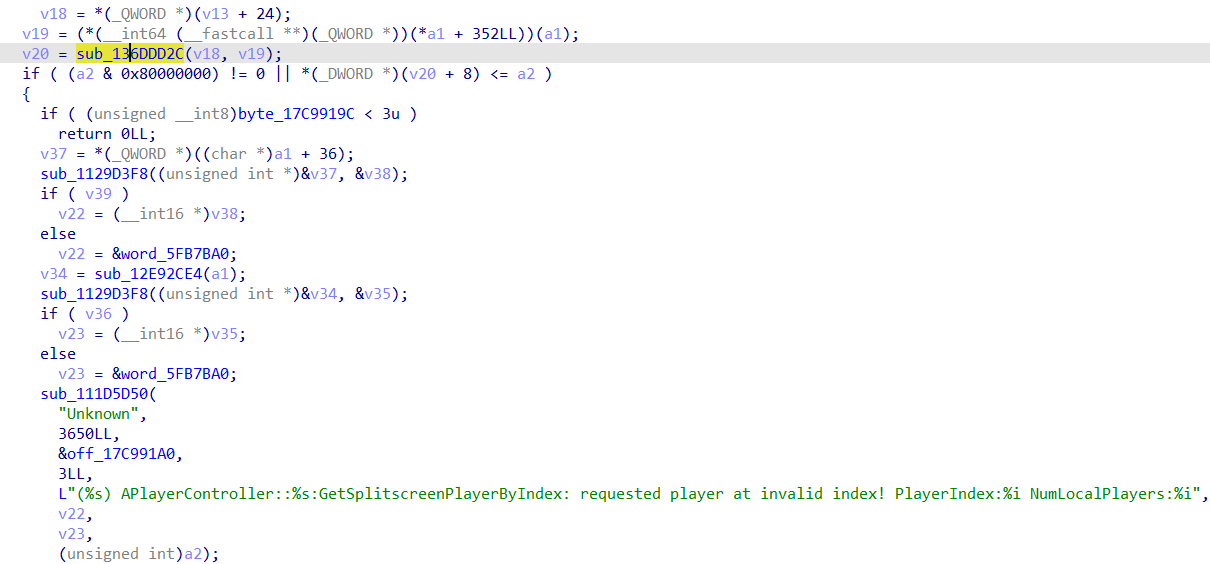
根据源代码,我们可以知道, 最后一个调用就是GetLocalPlayers
const TArray<class ULocalPlayer*>& UEngine::GetGamePlayers(UWorld *World) const
{
	const FWorldContext &Context = GetWorldContextFromWorldChecked(World);
	if ( Context.OwningGameInstance == NULL )
	{
		return HandleFakeLocalPlayersList();
	}
	return Context.OwningGameInstance->GetLocalPlayers();
}
我们双击跳转过去,唉?这有两个返回,真奇怪是吧!
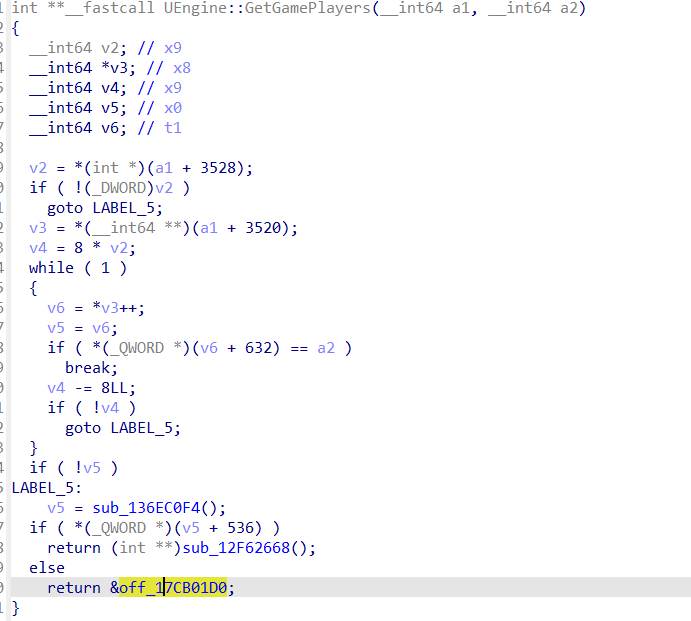
其实我们看一下HandleFakeLocalPlayersList的实现就知道其实off_17CB01D0就是FakeEmptyLocalPlayers
const TArray<class ULocalPlayer*>& HandleFakeLocalPlayersList()
{
#if 0
	if (!IsRunningCommandlet())
	{
		UE_LOG(LogLoad, Error, TEXT("WorldContext requested with NULL game instance object.") );
		check(false);
	}
#endif
	check(FakeEmptyLocalPlayers.Num() == 0);
	return FakeEmptyLocalPlayers;
}IDA定位PlayerContronller
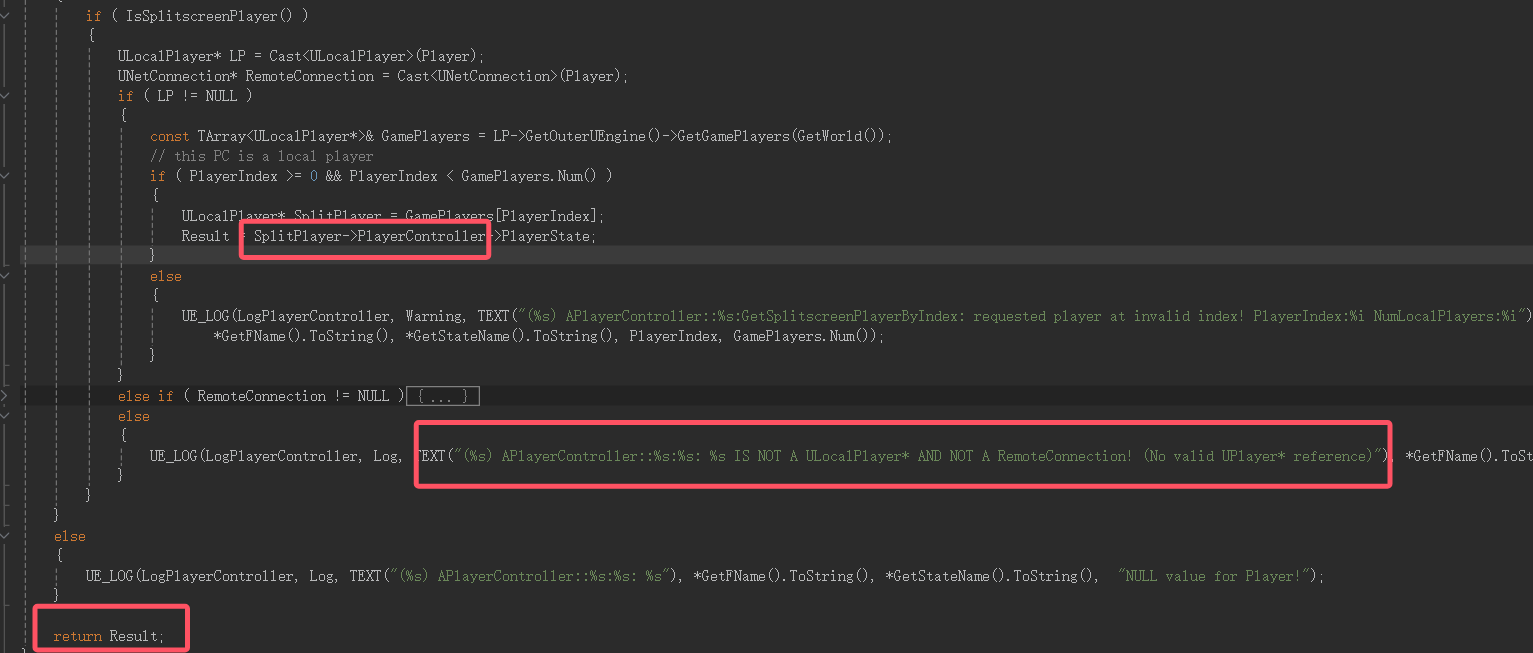
根据源代码,我可以看到Player有一处获取了PlayerController
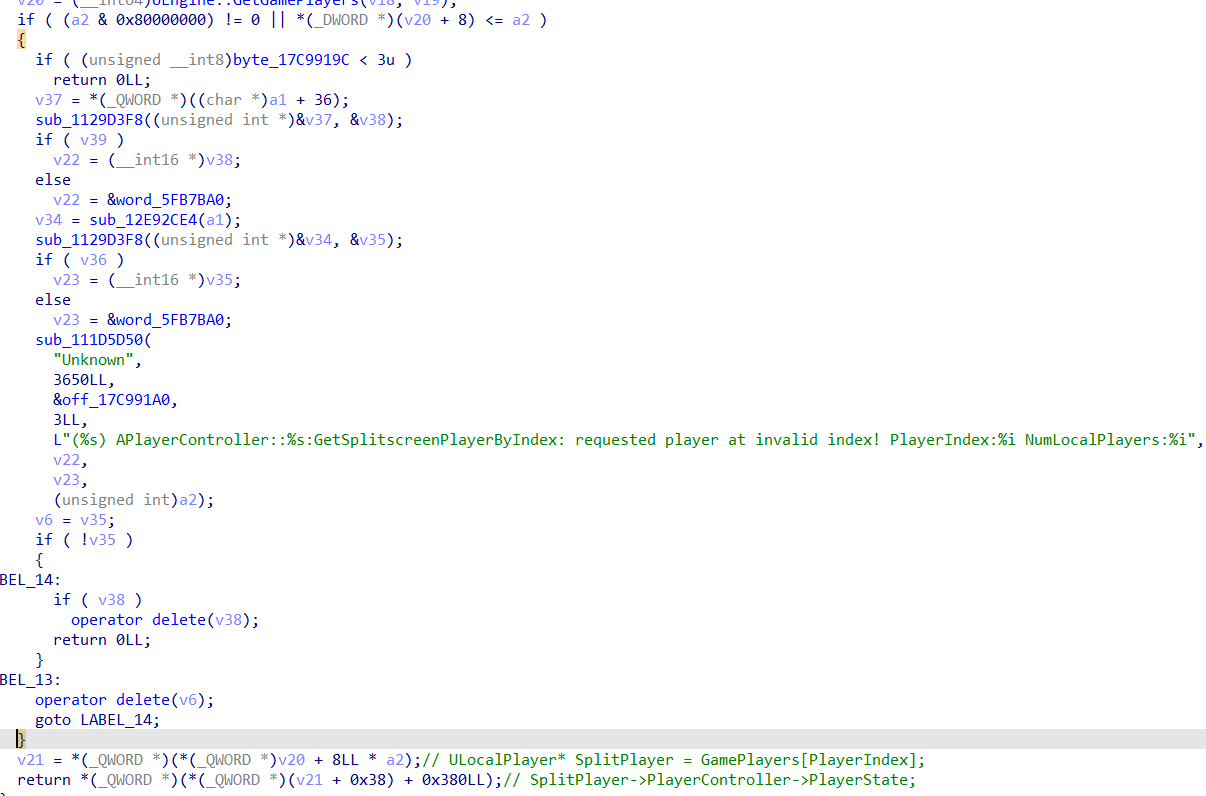
根据(%s) APlayerController::%s:%s: %s IS NOT A ULocalPlayer* AND NOT A RemoteConnection! (No valid UPlayer* reference) 可以定位到PlayerController的偏移。
定位Pawn
使用IDA定位Pawn
AActor* UBTNode::GetGameplayTaskAvatar(const UGameplayTask* Task) const
{
	if (Task == nullptr)
	{
		if (IsInstanced())
		{
			const UBehaviorTreeComponent* BTComponent = Cast<const UBehaviorTreeComponent>(GetOuter());
			//not having BT component for an instanced BT node is invalid!
			check(BTComponent);
			return BTComponent->GetAIOwner();
		}
		else
		{
			UE_LOG(LogBehaviorTree, Warning, TEXT("%s: Unable to determine default GameplayTaskAvatar!"), *GetName());
			return nullptr;
		}
	}

	const UAITask* AITask = Cast<const UAITask>(Task);
	if (AITask)
	{
		return AITask->GetAIController() ? AITask->GetAIController()->GetPawn() : nullptr;
	}

	const UGameplayTasksComponent* TasksComponent = Task->GetGameplayTasksComponent();
	return TasksComponent ? TasksComponent->GetGameplayTaskAvatar(Task) : nullptr;
}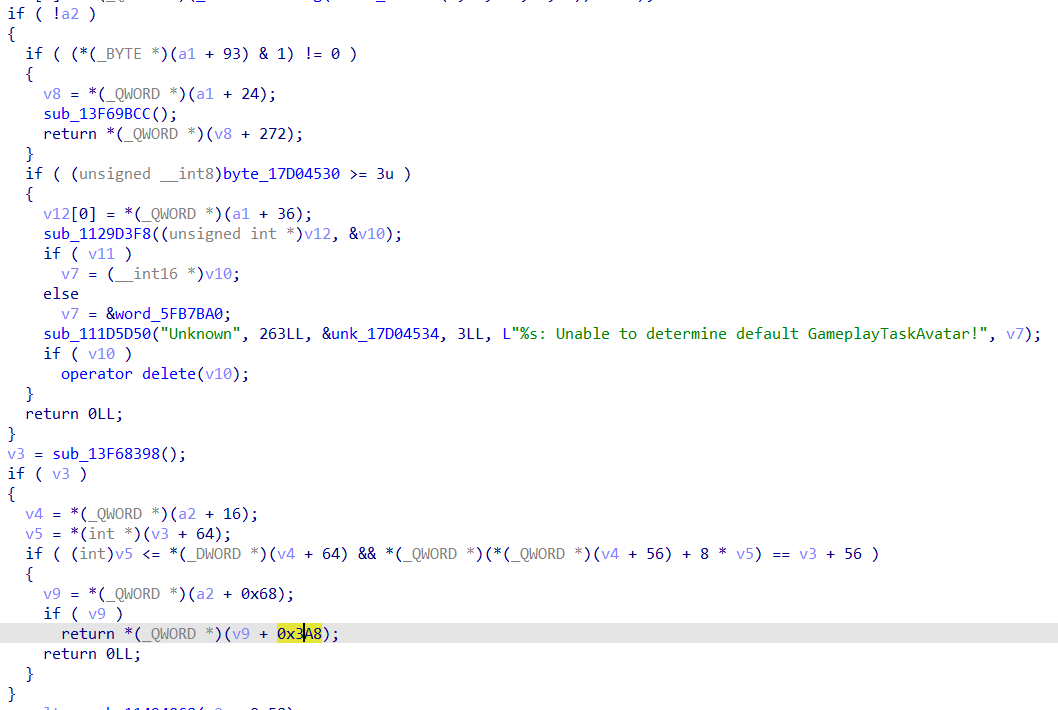
0x68就是從task裏面獲取那個Controller啦!然後那個0x3a8就是獲取Pawn((((
使用内存扫描器定位
private:
	/** Pawn currently being controlled by this controller.  Use Pawn.Possess() to take control of a pawn */
	UPROPERTY(replicatedUsing=OnRep_Pawn)
	APawn* Pawn;

	/**
	 * Used to track when pawn changes during OnRep_Pawn.
	 * It's possible to use a OnRep parameter here, but I'm not sure what happens with pointers yet so playing it safe.
	 */
	TWeakObjectPtr< APawn > OldPawn;

	/** Character currently being controlled by this controller.  Value is same as Pawn if the controlled pawn is a character, otherwise nullptr */
	UPROPERTY()
	ACharacter* Character;

	/** Component to give controllers a transform and enable attachment if desired. */
	UPROPERTY()
	USceneComponent* TransformComponent;
0x38 -> 0 -> 0x30: Wuwa通用公式,可惜没什么鸟用!因为大部分情况下都会魔改,如果你要用内存修改器去定位的话,牢中牢
只能反向去定位出来,可能还会因为偏移跨了好几个页然后boom!
IDA定位RootComponent
先贴一下代码,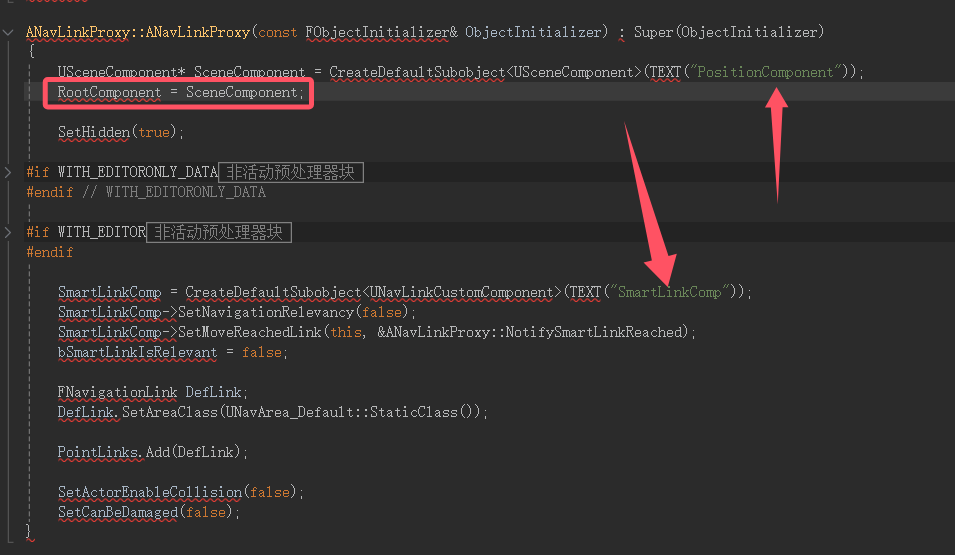
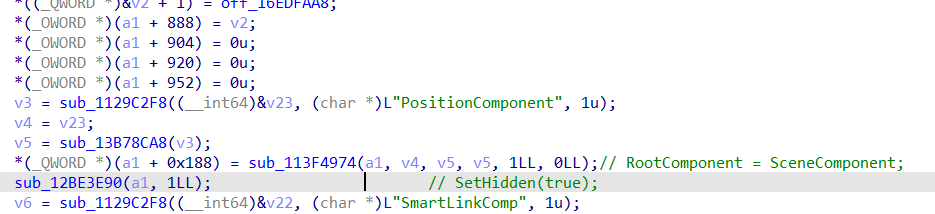
轻轻松松,什么你说你要用GG修改器去获取?呜,也不是不可以
用修改器去找的奇淫技巧
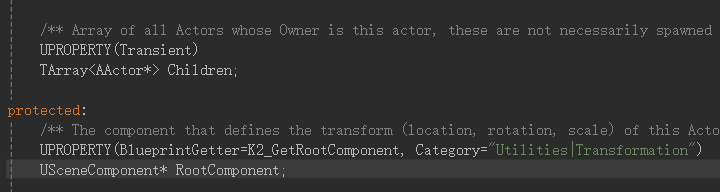
笨比看着!你要的ROOTCOMPONENT上面有一个TArray,怎么说呢?就是你要的那个玩意的指针上面有两个int,分别是数组大小和数组最大大小。
IDA定位UE4系列的坐标
	/** Location of the component relative to its parent */
	UE_DEPRECATED(4.24, "This member will be made private. Please use GetRelativeLocation or SetRelativeLocation.")
	UPROPERTY(EditAnywhere, BlueprintReadOnly, ReplicatedUsing=OnRep_Transform, Category = Transform)
	FVector RelativeLocation;

	/** Rotation of the component relative to its parent */
	UE_DEPRECATED(4.24, "This member will be made private. Please use GetRelativeRotation or SetRelativeRotation.")
	UPROPERTY(EditAnywhere, BlueprintReadOnly, ReplicatedUsing=OnRep_Transform, Category=Transform)
	FRotator RelativeRotation;

	/**
	*	Non-uniform scaling of the component relative to its parent.
	*	Note that scaling is always applied in local space (no shearing etc)
	*/
	UE_DEPRECATED(4.24, "This member will be made private. Please use GetRelativeScale3D or SetRelativeScale3D.")
	UPROPERTY(BlueprintReadOnly, ReplicatedUsing=OnRep_Transform, interp, Category=Transform)
	FVector RelativeScale3D;

	/**
	* Velocity of the component.
	* @see GetComponentVelocity()
	*/
	UPROPERTY()
FVector ComponentVelocity;根据源代码我们可以知道上面会对RelativeLocation什么的进行调用,因为RelativeLocation RelativeRotation RelativeScale3D ComponentVelocity是按照顺序排列的
	USceneComponent* OldRoot = RootComponent;
	USceneComponent* OldRootParent = (OldRoot ? OldRoot->GetAttachParent() : nullptr);
	bool bHadRoot = !!OldRoot;
	FRotator OldRotation; // 3f
	FVector OldTranslation; // tf
	FVector OldScale;
	if (bHadRoot)
	{
		OldRotation = OldRoot->GetRelativeRotation();
		OldTranslation = OldRoot->GetRelativeLocation();
		OldScale = OldRoot->GetRelativeScale3D();
	}

	Super::PostLoadSubobjects(OuterInstanceGraph);

	ResetOwnedComponents();

	if (RootComponent && bHadRoot && OldRoot != RootComponent && OldRoot->IsIn(this))
	{
		UE_LOG(LogActor, Log, TEXT("Root component has changed, relocating new root component to old position %s->%s"), *OldRoot->GetFullName(), *GetRootComponent()->GetFullName());
		GetRootComponent()->SetRelativeRotation_Direct(OldRotation);
		GetRootComponent()->SetRelativeLocation_Direct(OldTranslation);
		GetRootComponent()->SetRelativeScale3D_Direct(OldScale);
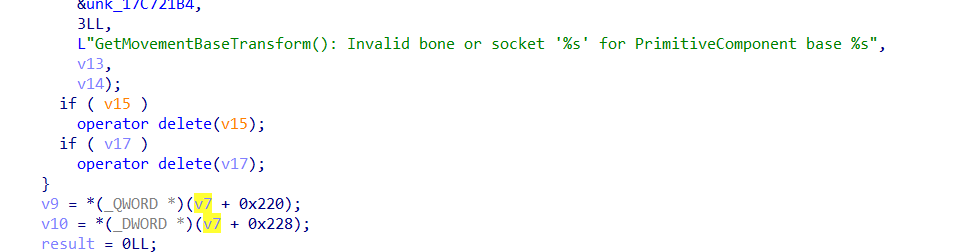
我们可以通过其中任意一个找到其他的,下面是ida找到的LOG位置83行,我们往上找!

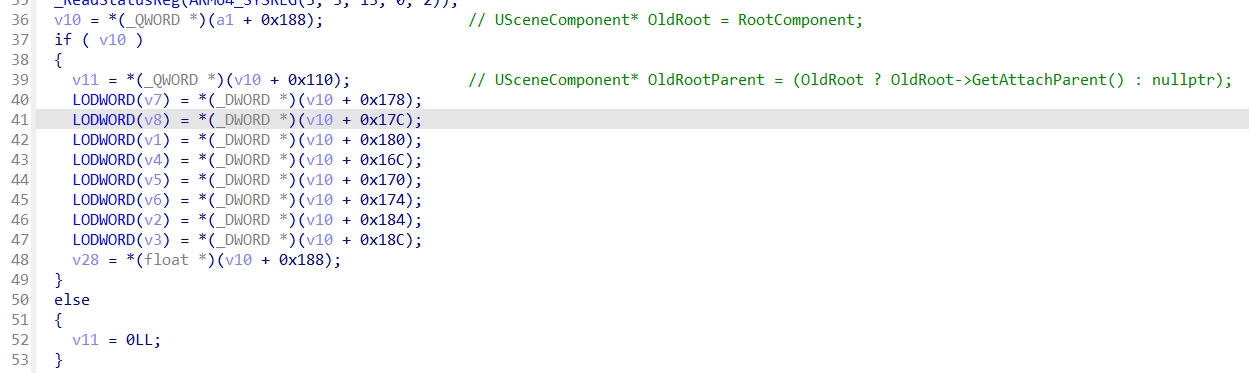
我们简化一下代码!嘻嘻(((那么找到别的不是轻轻松松?反正一般来说也没人魔改这个结构(((
    LODWORD(v7) = *(_DWORD *)(v10 + 0x178);
    LODWORD(v8) = *(_DWORD *)(v10 + 0x17C);
    LODWORD(v1) = *(_DWORD *)(v10 + 0x180); // GetRelativeRotation

    LODWORD(v4) = *(_DWORD *)(v10 + 0x16C);
    LODWORD(v5) = *(_DWORD *)(v10 + 0x170);
    LODWORD(v6) = *(_DWORD *)(v10 + 0x174); // GetRelativeLocation

    LODWORD(v2) = *(_DWORD *)(v10 + 0x184);
    LODWORD(v3) = *(_DWORD *)(v10 + 0x188);
    LODWORD(v28) = *(_DWORD *)(v10 + 0x18C); // GetRelativeScale3D
介绍定位出来的没什么鸟用的东西
其实这几个东西都是没什么鸟用的,就是用来判断有没有漏手什么的,这就是漏打...但是这个漏打的方案太垃圾,一般不用这些,我还是说一下这几个定位出来的是什么东西吧!
FVector RelativeLocation
这是一个表示相对位置的向量
存储组件相对于其父组件的位置信息
包含 X、Y、Z 三个坐标值
使用相对坐标系统,更容易进行局部空间的变换
FRotator RelativeRotation
表示相对旋转的旋转器
存储组件相对于其父组件的旋转信息
包含 Pitch(俯仰)、Yaw(偏航)、Roll(翻滚)三个旋转角度
单位为度(degrees)
FVector RelativeScale3D
表示相对缩放的三维向量
控制组件相对于其父组件的缩放比例
X、Y、Z 分别表示三个方向的缩放系数
默认值为(1,1,1),表示原始大小
FVector ComponentVelocity
表示组件的速度向量
存储组件在世界空间中的移动速度
单位通常是厘米/秒
可用于物理模拟和运动计算
获取世界绝对坐标
如果想获取角色在世界/地图空间中的绝对位置,应该使用 GetActorLocation() 或者查看 Actor 的 WorldLocation。
这些相关的位置属性区别是:
WorldLocation (或通过 GetActorLocation() 获取)
这是角色在整个地图/世界空间中的绝对位置
不受父子关系影响
从地图原点(0,0,0)开始计算的坐标
RelativeLocation
这是相对于父组件的局部位置
会受到父组件位置的影响
主要用于组件之间的相对布局
所以如果你想知道角色在地图中的具体位置,应该使用:
FVector WorldLocation = YourActor->GetRootComponent()->GetComponentLocation();
// 或者
FVector ActorLocation = YourActor->GetActorLocation();
而不是使用 RelativeLocation,因为 RelativeLocation 只能告诉你组件相对于其父组件的位置关系。
怎么老有人问我这个,其实想象一个角色拿着手电筒:
角色是父组件
手电筒是子组件
手电筒的 RelativeLocation 就是描述:
手电筒相对于角色的位置
比如手电筒在角色前方 50 厘米,向上 150 厘米的位置
这时 RelativeLocation 可能是 (50, 0, 150)
重要特点:
父组件移动时,子组件会跟着移动
当角色走动时,手电筒会自动跟随
手电筒始终保持相对于角色的固定位置
父组件旋转时,子组件的相对位置也会跟着旋转
当角色转身时,手电筒也会跟着转
手电筒始终保持在角色前方 50 厘米处
多层级关系
可以有多层父子关系,比如:
角色(爷爷组件)
手臂(父组件)
手电筒(子组件)
每一层都通过 RelativeLocation 来定义相对位置
这种父子关系的设计让你能更方便地:
管理相关物体的位置关系
实现物体之间的联动
进行局部的位置调整


其实我们要的是174行往下到316行的这个ComponentToWorld (翻译是组件相对于世界的当前转换)>
ps: 老毕等!我都说了这个玩意不用再解址了,这玩意不是个指针! 张开眼睛看世界,下面是源代码和概述!
FQuat Rotation (由4个float组成)
这是用四元数(Quaternion)表示的旋转
相比欧拉角(FRotator),四元数可以避免万向节死锁(Gimbal Lock)
在内部计算和插值时更稳定和高效
虽然不如欧拉角直观,但在程序中处理旋转是最可靠的方式
FVector Translation
表示变换的位移/平移
定义了物体在空间中的位置变化
是一个三维向量,包含 X、Y、Z 坐标
类似于我们之前讨论的 Location,但是作为变换的一部分
FVector Scale3D
定义物体在本地空间的缩放
默认值是 (1,1,1),表示原始大小
X、Y、Z 分别控制三个方向的缩放比例
比如 (2,1,1) 表示 X 方向拉伸为原来的两倍
struct FTransform
{
	/** Rotation of this transformation, as a quaternion. */
	UPROPERTY(EditAnywhere, BlueprintReadWrite, Category=Transform, SaveGame)
	FQuat Rotation;

	/** Translation of this transformation, as a vector. */
	UPROPERTY(EditAnywhere, BlueprintReadWrite, Category=Transform, SaveGame)
	FVector Translation;

	/** 3D scale (always applied in local space) as a vector. */
	UPROPERTY(EditAnywhere, BlueprintReadWrite, Category=Transform, SaveGame, meta=(MakeStructureDefaultValue = "1,1,1"))
	FVector Scale3D;
};
我们先来看一坨源代码
	bool GetMovementBaseTransform(const UPrimitiveComponent* MovementBase, const FName BoneName, FVector& OutLocation, FQuat& OutQuat)
	{
		if (MovementBase)
		{
			if (BoneName != NAME_None)
			{
				bool bFoundBone = false;
				if (MovementBase)
				{
					// Check if this socket or bone exists (DoesSocketExist checks for either, as does requesting the transform).
					if (MovementBase->DoesSocketExist(BoneName))
					{
						MovementBase->GetSocketWorldLocationAndRotation(BoneName, OutLocation, OutQuat);
						bFoundBone = true;
					}
					else
					{
						UE_LOG(LogCharacter, Warning, TEXT("GetMovementBaseTransform(): Invalid bone or socket '%s' for PrimitiveComponent base %s"), *BoneName.ToString(), *GetPathNameSafe(MovementBase));
					}
				}

				if (!bFoundBone)
				{
					OutLocation = MovementBase->GetComponentLocation();// 目标!
					OutQuat = MovementBase->GetComponentQuat();
				}
				return bFoundBone;
			}

			// No bone supplied
			OutLocation = MovementBase->GetComponentLocation();
			OutQuat = MovementBase->GetComponentQuat();
			return true;
		}

		// nullptr MovementBase
		OutLocation = FVector::ZeroVector;
		OutQuat = FQuat::Identity;
		return false;
}一个定位飞过去,直接拿到0x220是我们要的世界绝对坐标